

Taxi Cam: free taxi cameras for the A350 and A380 in MSFS 2024
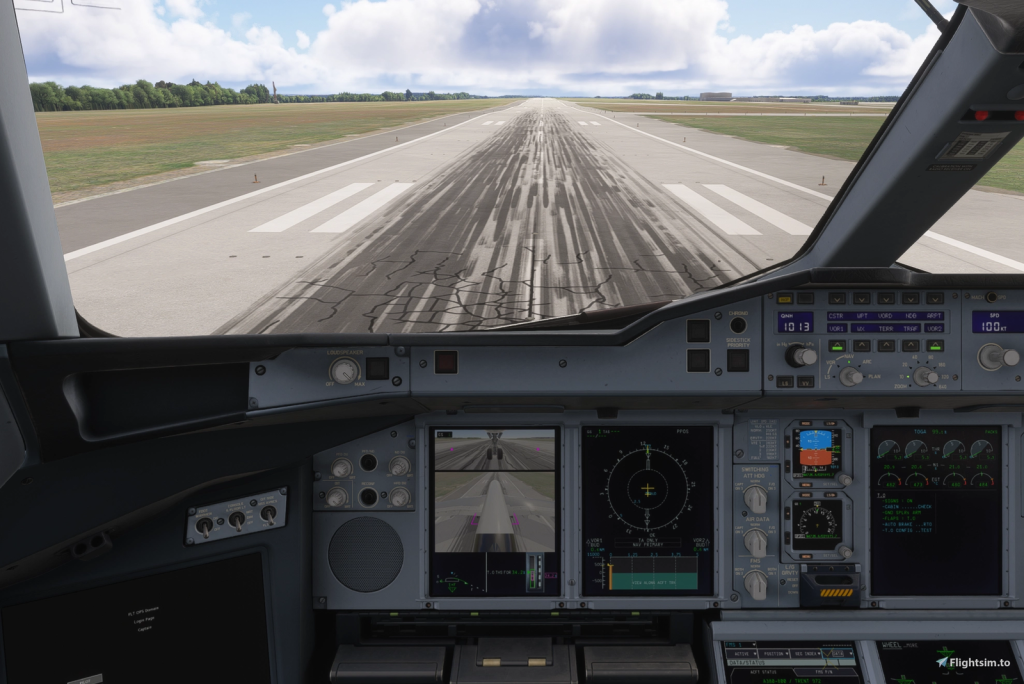
A developer known as rdat12 has released Taxi Cam, a free add-on for MSFS 2024. It shows live feeds from cameras on the nose landing gear and the tail on the Primary Flight Display (PFD). On the real A350 and A380 these cameras help pilots see the wheels while taxiing, and now the sim has them too.
What’s inside
- Supported aircraft: FlyByWire A380X, iniBuilds A350-900 (including the ULR), A350-1000 and A380. The aircraft themselves are not included.
- The cameras switch on with the TAXI button on the EFIS panel (display controls). On the iniBuilds A380 that button is inoperative, so there are keyboard shortcuts instead: Ctrl+Shift+L, R or B (configurable).
- The feed shows reference lines and ground speed. Above 60 knots the cameras turn off on their own.
- Camera position, angle and zoom, exposure and marking colours are set per aircraft type. The refresh rate goes from 15 to 60 fps.
- It runs as a separate Windows app that starts with MSFS and sits in the system tray.
Price and availability
Free and open source (GPLv3), available on flightsim.to. It needs 64-bit Windows 10 or 11 and MSFS 2024. The developer doesn’t mention MSFS 2020, and since it is a Windows app it won’t work on Xbox.
The developer is upfront about the limits: the add-on hooks into rendering in an unsupported way, so it may break after a sim or aircraft update. The extra cameras cost performance, taxiway lights look faint in the feed, and ReShade may need troubleshooting.
Who it’s for
Anyone flying the big Airbus jets who wants the cockpit to work like the real airliner. On a weaker PC, lower the camera refresh rate so the sim itself doesn’t lose frames.
Source: Flightsim.to